How Precision Protects Your Privacy
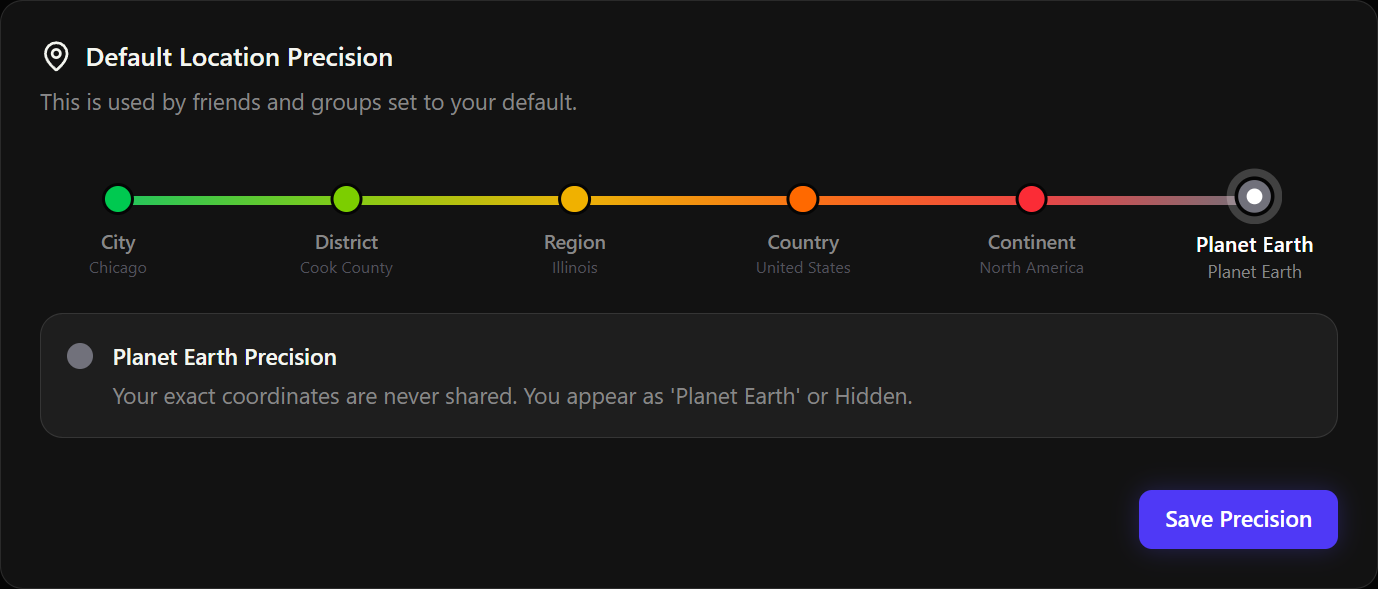
Precision is the core privacy feature in Tsukimi. It controls how specifically your location is generalized before anyone else can see it.
The six levels
| Level | What others see | Example |
|---|---|---|
| 🟢 City | Your city name | "Chicago" |
| 🟢 District | Your county or district | "Cook County" |
| 🟡 Region | Your state or province | "Illinois" |
| 🟠 Country | Your country | "United States" |
| 🔴 Continent | Your continent | "North America" |
| ⚫ Planet Earth | Just "Planet Earth" | "Planet Earth" |
How it works
When you set your precision level, Tsukimi takes your actual coordinates and generates a display location that matches your chosen precision. Your real coordinates are never shared with anyone.
For example, if you're at a specific address in Chicago and your precision is set to "Region," friends will only see "Illinois." If you change it to "Continent," they'll only see "North America."
Default precision vs. per-group precision
Your default precision (set in Settings > Privacy) applies to all your friends. But you can also set different precision levels for individual groups. For example:
- Your close friends' group might see your city
- A larger community group might only see your country
Display location vs. actual location
On your Profile page, you'll see two location entries:
- Actual Location: Where you really are (only visible to you)
- Display Location: What others see, based on your precision level
Location precision limits
Sometimes your geolocation data isn't precise enough to support fine-grained levels. If your browser provides a location with low accuracy, some precision levels may not be available and will be marked as limited.
Changing your precision
Go to Settings > Privacy > Default Location Precision to adjust the slider. Your display location will update automatically when you save.